


Chrome 155 Update Brings Enhanced Web App Support to GoogleBooks
Google’s recent release of Chrome 155 introduces significant improvements for web apps on GoogleBooks, facilitating broader installation options and improved system integration.
New Installation Capabilities
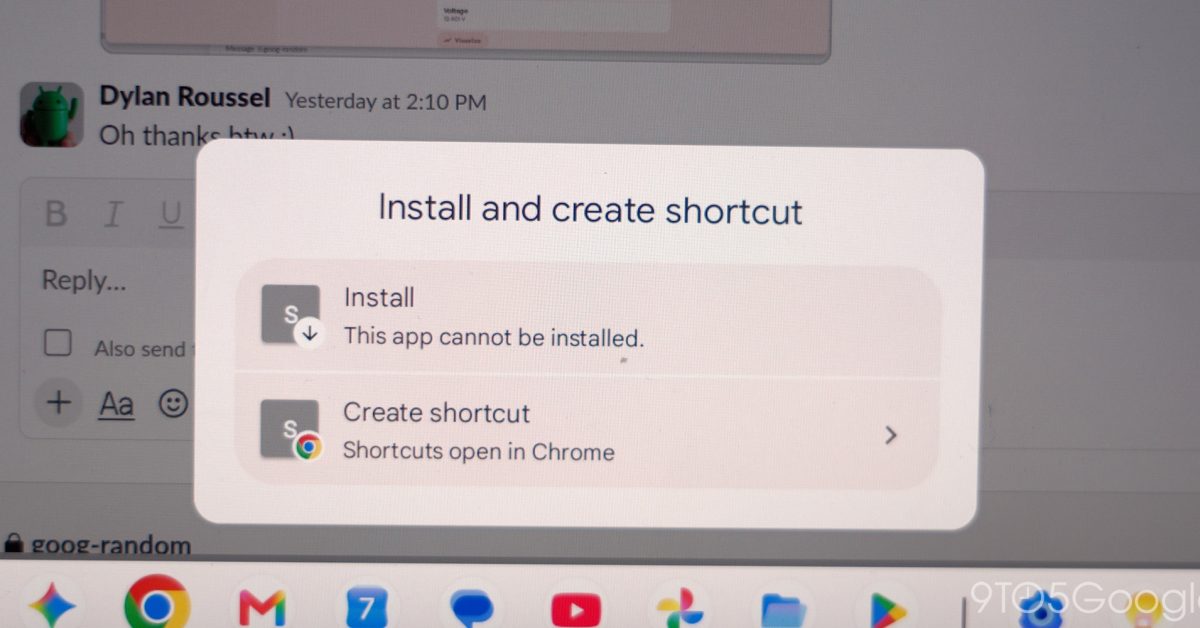
Before this update, users could only install web apps that were specifically designed with a web manifest in Chrome on GoogleBooks, a platform aimed at delivering desktop-level experiences to Android users. Pages lacking this configuration would simply open as regular browser tabs.
Google has acknowledged community feedback regarding this limitation. With Chrome 155, the browser now allows users to manually install any webpage as a standalone app, which enhances user accessibility and experience.
Steps to Install Web Apps
To install a webpage as an app on your GoogleBooks device, follow these steps:
- Open Chrome on your GoogleBooks device.
- Navigate to the desired website.
- Access the Chrome menu located at the top right, then go to Save and share > Install and create shortcut…
- If available, click on Install at the address bar’s top right corner.
- Follow the on-screen instructions to complete the installation.
For users who created browser-tab shortcuts before this update, it is advisable to delete those shortcuts and reinstall the page using the new steps.
Enhanced App Functionality
Web apps installed after this update can now be integrated more comprehensively into the GoogleBooks environment. Users can pin these apps to their taskbar or homescreen, allowing them to run efficiently in the Chrome browser.
Additionally, these apps will benefit from features like shared Google Account logins, cookie handling, site permissions, and access to installed browser extensions, making the overall experience more seamless.
Revamped Chrome Settings
In a further update, Chrome Settings has transitioned from a fullscreen interface, previously observed in mobile versions, to a more user-friendly tab format. This change allows users to easily reference web pages while adjusting their settings.
Availability
The latest version, Chrome 155.0.8059.79, is currently being rolled out via the Play Store for all GoogleBooks devices.
