


Enhancing Security with AI Phishing Detection in Microsoft Teams
Microsoft is set to implement an innovative AI-enabled phishing detection feature within Microsoft Teams. This new capability will utilize the context of conversations to identify potential scams, even in the absence of harmful links or attachments. The primary focus will be on initial interactions with external contacts, where attackers often masquerade as trusted personnel to solicit sensitive information from employees.
Overview of the New AI Feature
This development was detailed in Message Center notice MC1519866, released on October 21, 2026. The rollout for the targeted release is anticipated to commence in early November, concluding by mid-November. General availability for users worldwide is set for early to mid-December 2026, extending beyond the initially planned timeline for November.
How Contextual Analysis Aids Phishing Detection
Conventional indicators of phishing—such as dubious links or malicious attachments—are not consistently apparent in social engineering attacks. Cybercriminals can construct messages that appear genuine, create a sense of urgency regarding account issues, and manipulate individuals into providing passwords or granting remote access.
According to Microsoft, the new feature will assess conversation context, enabling it to detect phishing attempts, impersonations, social engineering tactics, and deceptive intent. Support documentation specifies that this protection will encompass both individual and group chats with new external contacts on mobile, desktop, and web platforms. Coverage currently includes major operating systems like Android, iOS, Mac, desktop, and web within the standard global cloud framework.
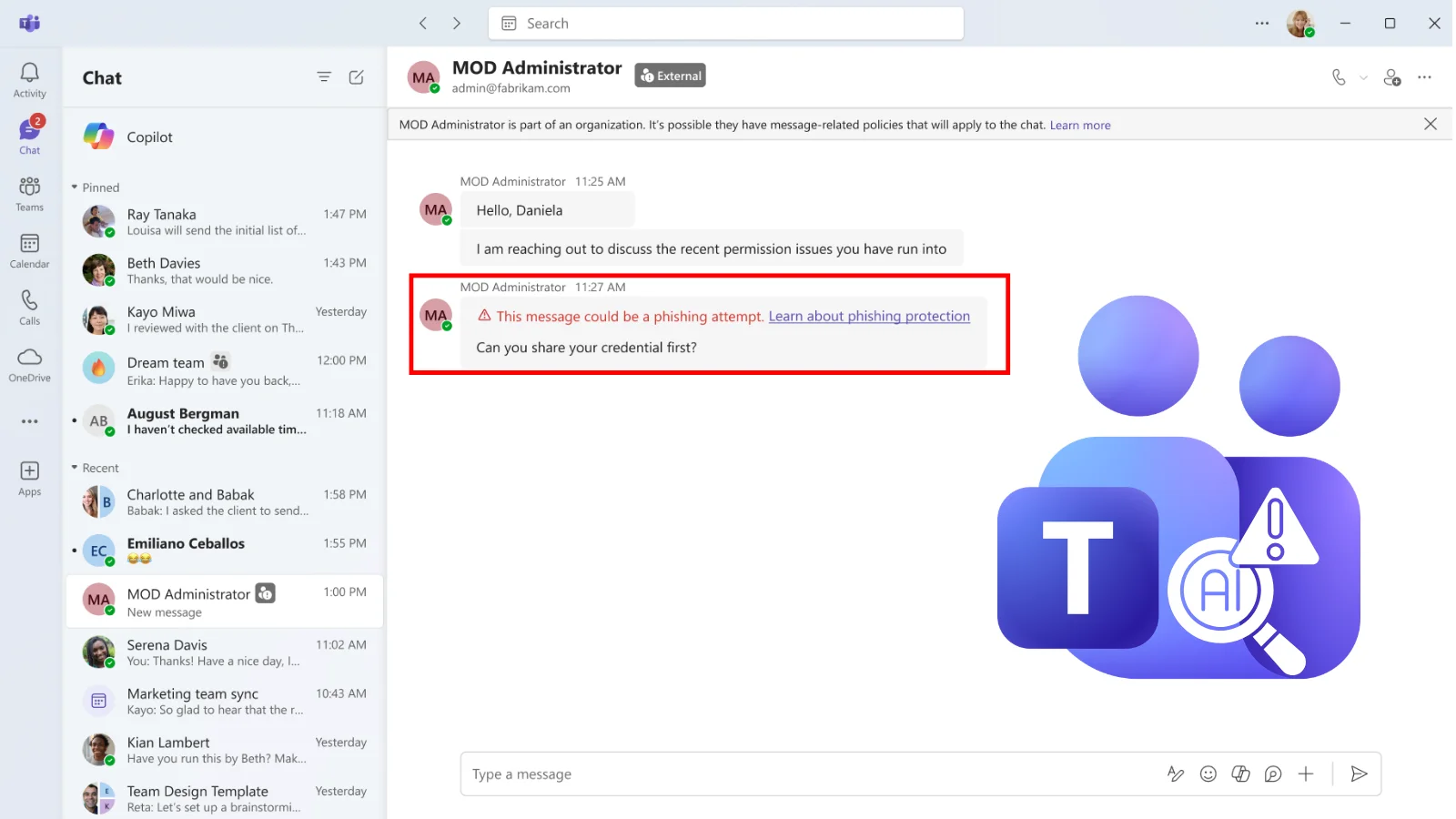
Illustration of Phishing Detection
An illustrative example provided by Microsoft features an external account labeled “MOD Administrator,” which discusses access permission issues and subsequently inquires, “Can you share your credential first?” In response to such messages, Teams will present a warning indicating that the correspondence may be a phishing attempt. This example emphasizes the significance of understanding the conversational context, even in the absence of overtly harmful URLs.
Identifying Familiar Attack Patterns
This feature directly addresses prevalent tactics among cybercriminals. Previous reports highlighted instances where attackers impersonated IT help desk agents via Teams, seeking to deceive users into unintentionally downloading malware or granting unauthorized access. Similar incidents have been noted where fraudulent support personnel exploited tools like Quick Assist after initially contacting employees through external Teams accounts.
Implementation Timeline and User Experience
Initially, detection capabilities may function transparently as Microsoft validates performance quality. Following this assessment phase, visible alerts will be deployed, although users should not expect to see a notification for every suspicious message during the initial rollout. The primary emphasis is on protecting first-contact conversations with external users, though certain mobile users in China may receive similar protections for internal interactions—an adaptation driven by local fraudulent activities.
Organizational Recommendations
Organizations need not make any new administrator configurations to activate this protective feature. Microsoft encourages administrators to familiarize themselves with guidance around external contacts and urges users to report any suspicious activities or incorrect alerts that arise.
- When encountering a warning, employees should verify the sender’s identity through secure channels.
- Confirmed phishing attempts should be reported and blocked, while false alerts can be flagged as non-issues.
- Employees must remain vigilant and refrain from disclosing passwords, verification codes, or financial details in unsolicited support dialogues.
This update serves as an additional layer of security; however, users should always independently verify unexpected requests for support. The absence of a warning does not equate to guaranteed safety.
As phishing techniques evolve, organizations must enhance their defenses against emerging malware threats. Partnering with Threat Intelligence (TI) feeds and leveraging data from over 16,000 Security Operations Centers (SOCs) can provide critical insights into new threats.
