


Introducing the New Xbox PC App: Faster with Enhanced Features
Microsoft has officially launched a significantly updated version of its Xbox PC app, promising users a performance boost of up to 60% in load times. This revamped application coincides with recent aesthetic enhancements made to Xbox Cloud Gaming across various platforms, including web browsers and smart TVs.
Faster Performance and Improved Navigation
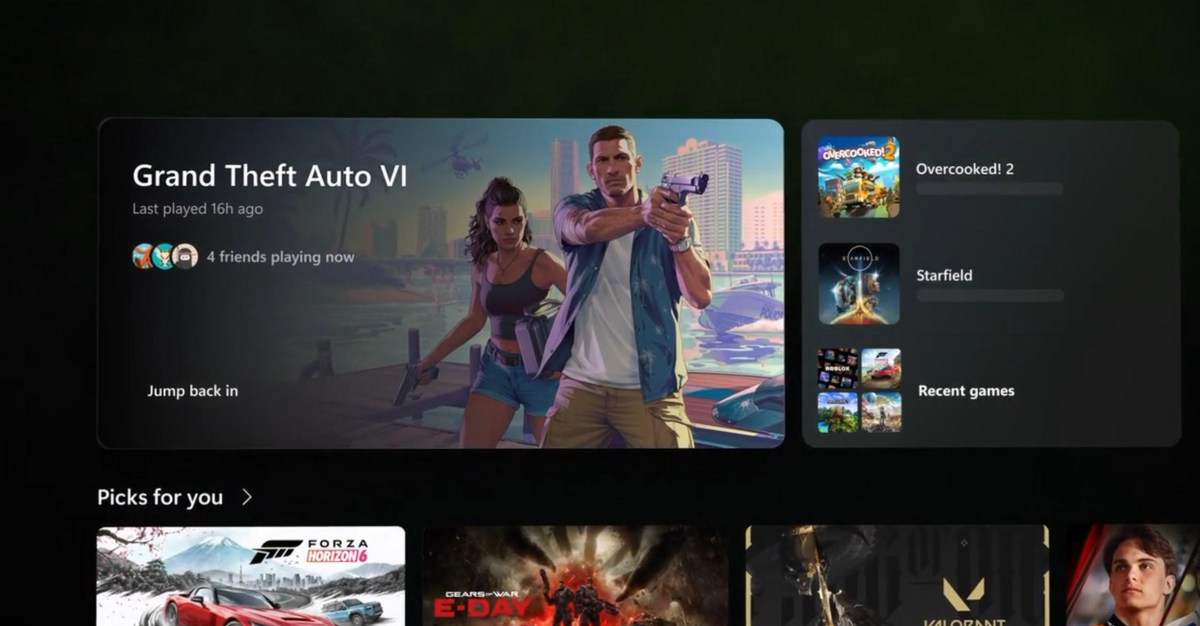
The redesigned Xbox PC app aims to provide a seamless gaming experience that mirrors that of Xbox consoles. As outlined by Jason Beaumont, Vice President of Xbox Experiences, “The app now launches up to 60 percent faster.” Additionally, key sections within the app, such as Home, Store, and Game Pass, are reported to load up to 50% more quickly, while in-app windows can now open up to 65% faster.
- Launch speed improved by up to 60%
- Home, Store, and Game Pass pages load up to 50% faster
- In-app windows open 65% faster
Navigational changes have been implemented for better accessibility with game controllers, enhancing the overall user interface. The library now features more refined filters and organizational tools, making it easier for players to manage their installed games.
Enhanced Social Features
Furthermore, improvements have been made to the social functionalities within the Xbox PC app. Friends are now prominently displayed on the main page, along with convenient buttons for initiating chats or joining parties. The overall feel of the app has been altered to blend native and web elements more effectively, creating an experience that aligns more closely with the Xbox dashboard.
User Experience Improvements
Feedback from users who have tested the application highlights its improved speed and navigability. One tester noted, “I’ve found it’s much easier to navigate around with a controller, and the search interface no longer tries to pop up when you’re moving between sections.”
However, some users have pointed out that the redesigned Game Bar interface on handhelds may appear inconsistent with these recent updates. Microsoft is aware of this, indicating that future enhancements are in the works to ensure cohesion across devices.
Xbox Cloud Gaming Integration
The aesthetic updates are also set to be rolled out for Xbox Cloud Gaming. Beaumont states, “We’re also bringing the refreshed Xbox web experience to more players and rolling out updates to Xbox Cloud Gaming apps on supported TVs and VR headsets.” This integration will include a similar design philosophy across platforms while tailoring the user experience based on specific device needs.
- New library tab for cloud games linked to Xbox Game Pass
- Desktop mode optimized for larger displays
- Choice of dark and light modes, plus five new high-contrast options for accessibility
This refreshed design aims to maintain familiarity across different platforms, ensuring users can efficiently find and access their games regardless of their chosen device.
Conclusion
Microsoft’s updates to the Xbox PC app denote a significant step toward enhancing the gaming experience on Windows. By prioritizing faster performance, simplified navigation, and improved social features, the new app promises to bridge the gap between console and PC gaming, while also paving the way for a more integrated experience across cloud gaming and smart television interfaces.
